What Is B-Roll? The Complete Guide for Modern Video Creators
If you've watched any professional video—whether on LinkedIn, YouTube, TikTok, or a corporate website—you’ve seen B-roll in action. It’s one of the fastest ways to make a video feel more dynamic, polished, and visually engaging.
But many creators and teams still aren’t sure what B-roll actually is, when to use it, or how to incorporate it into a modern content workflow.
This guide gives you a clean breakdown of what B-roll means, why it matters, and how to use it strategically in your videos.
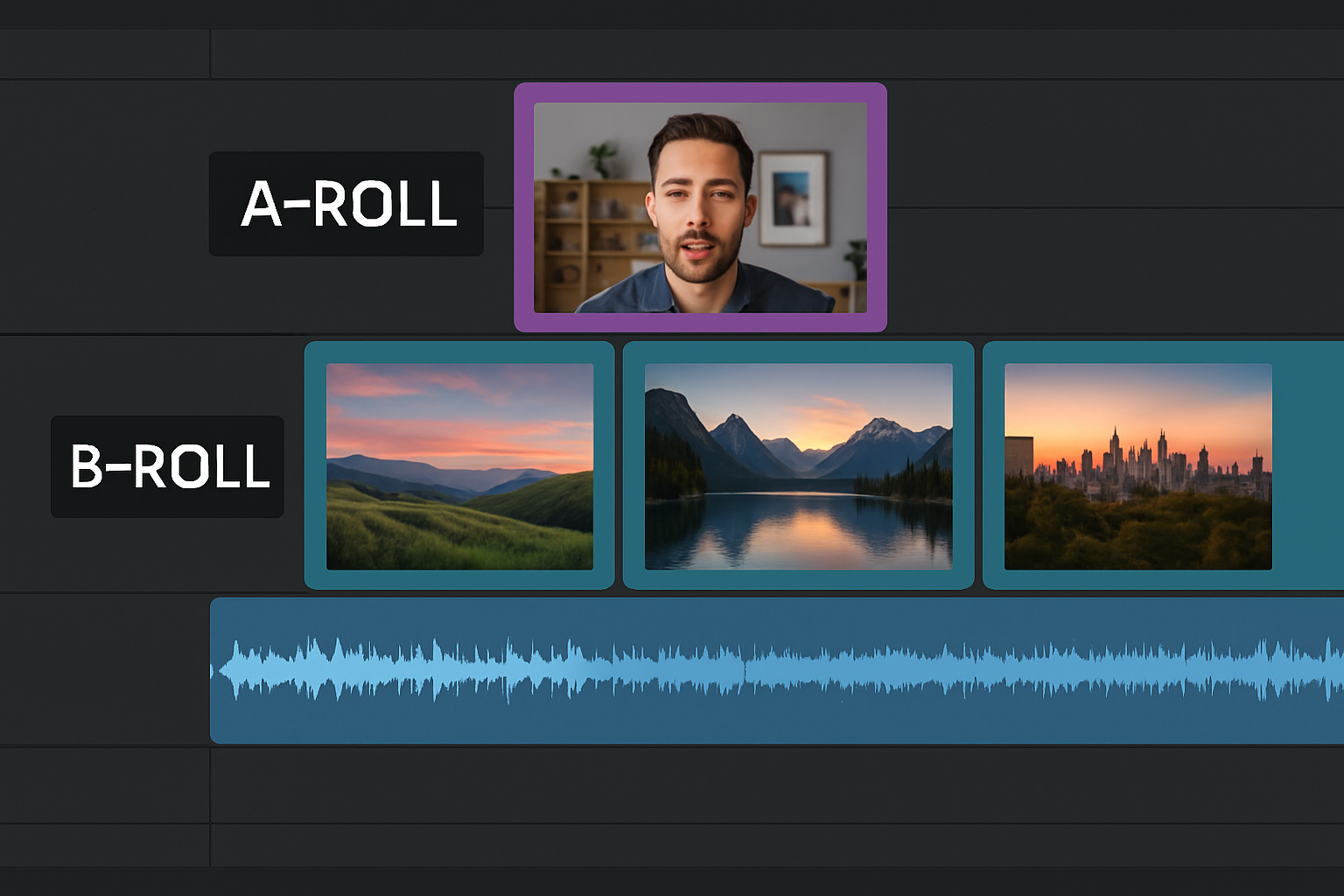
What Is B-Roll?
B-roll is the supplemental footage that plays on top of your main video content (your “A-roll”—typically a talking head, interview, or primary scene).
It adds context, emotion, motion, and visual interest to your story.
In simple terms:
A-roll = the main message. B-roll = everything that supports and enhances it.
This can include:
- Cutaway shots
- Close-ups
- Product shots
- Environment footage
- Hands typing, walking, working
- Screen recordings or demos
- Overlays and transitions
- Stock clips that match the narrative
B-roll transforms a simple talking-head clip into a richer, more professional experience.
Why B-Roll Matters
B-roll is not just decoration—it plays a strategic role in viewer engagement.
1. It Increases Watch Time
Movement keeps attention. Adding B-roll every 4–8 seconds increases retention and reduces scroll-aways.
2. It Adds Visual Context
If you're talking about customers, show customers. If you're describing a workflow, show the workflow.
3. It Helps Illustrate Complex Ideas
B-roll simplifies abstract concepts by pairing them with relatable visuals.
4. It Makes Video Feel More Premium
Even basic B-roll instantly elevates production value. It signals credibility and clarity.
5. It Covers Edits and Transitions
Cuts, mistakes, or jump edits become invisible when covered with B-roll.
Examples of Common B-Roll Types
Here are the most popular kinds of B-roll used in modern content:
Environmental B-Roll
Shots of offices, cities, nature, desks, conference rooms. Creates mood.
Action or Movement
Walking, collaborating, writing, typing, shaking hands.
Product B-Roll
App screen recordings, dashboards, workflows, packaging, physical products.
Hands / Close-ups
Hands turning pages, gestures, laptop close-ups.
Stock B-Roll
Professionally shot clips used to reinforce concepts (great for fast content production).
Cutaways
Quick shots that interrupt the talking head to add pacing or highlight ideas.
Where B-Roll Shows Up in Modern Videos
B-roll is used everywhere:
- LinkedIn thought leadership videos
- TikTok / Reels clips
- YouTube explainers
- Corporate interviews
- Internal communications
- Product demos
- Testimonials
- Event recaps
- Training videos
- Brand launches
If your video feels flat or static, it likely needs B-roll.
How Much B-Roll Should You Use?
Great rule of thumb:
Add new visual movement every 4–8 seconds.
This keeps the viewer engaged without overwhelming the message.
For short-form social content (30–60 seconds):
- Aim for 3–8 B-roll clips
- Vary the pacing
- Match B-roll to keywords in the script
For long-form content (3–10 minutes):
- Use B-roll strategically to reinforce each idea
- Cover jump cuts
- Reset pacing during transitions
Tips for Choosing the Right B-Roll
1. Match the Emotion
Your B-roll should reinforce tone:
- Inspirational
- Corporate
- Energetic
- Calm
- Analytical
2. Match the Subject
If you're talking about:
- Strategy → productivity or leadership visuals
- Customers → people or products in action
- Technology → screens, dashboards, devices
- Learning → collaboration, whiteboards, note-taking
3. Keep It Relevant (Avoid Generic Filler)
Stock footage is useful—but only when it reinforces the message.
4. Use Brand-Aligned Visuals
Consistent color, energy, and pacing create a recognizable style.
5. Don’t Overdo It
Too much B-roll can distract. Focus on enhancement, not noise.
How to Add B-Roll Without Editing Software
Traditionally, adding B-roll required:
- Timeline editing
- Manual downloads
- Masking jump cuts
- Multiple export steps
Modern tools (including Videospan) allow:
- Auto-generated B-roll
- Auto-matched clips to keywords
- Brand-aligned overlays
- Instant output without editing tools
This makes professional-looking video possible for any team or executive—no editor needed.
Final Thoughts: B-Roll Is the Secret to Great Video
B-roll is one of the simplest and most effective ways to level up your video content. It helps your story land, keeps viewers watching, and dramatically improves the professionalism of your output.
Remember:
- A-roll delivers the message
- B-roll delivers the emotion, clarity, and engagement
Once you start using B-roll intentionally, every video becomes easier to watch—and far more effective.
Read more
What Is B-Roll? The Complete Guide for Modern Video Creators
Learn what B-roll is, why it matters, and how to use it effectively to elevate your video content across LinkedIn, social channels, and professional productions.

How Companies Make Video a Strategic Priority
A framework for transforming video into a core part of company strategy.

Videospan Is Heading to Digital Summit Dallas 2025
We're excited to announce that Videospan will be at Digital Summit Dallas—connecting with marketers, creators, and digital leaders looking to scale brand-aligned video content.